Synthesia Review
Synthesia pricing and plan limits—AI avatars, languages, export quality, and commercial use explained below.
Pricing Last Verified: 02/13/2026
At-a-Glance
Pricing Model: Freemium
Starting Price: 18 USD/month
Free Plan: Yes
Free Trial: Yes
Synthesia Pricing Details
Quick answers to common Synthesia pricing and plan-limit questions. For the latest plan details, refer to the Pricing Last Verified badge and the plan information above.
Does Synthesia have a free plan or free trial?
Synthesia typically offers a way to test the platform (for example a demo or limited trial), but availability and terms can change. Check the pricing section above and Synthesia’s official site for the current free access options.
Synthesia pricing: which plan should you choose?
Choose your plan based on how often you publish videos and what you need most: number of AI videos you can produce, avatar access, collaboration features, and whether you need higher-tier controls for business use.
Synthesia avatar limits: how many avatars and videos can you make?
Avatar access and usage limits vary by plan. Some tiers focus on standard avatars for common use cases, while higher tiers expand avatar options, team workflows, and production limits for organizations creating video at scale.
Synthesia export quality: is 1080p or 4K available?
Export resolution and advanced production settings can vary by plan. If export quality is critical for your workflow, confirm what resolution is included on your tier before committing.
Synthesia languages and voices: what’s supported?
Synthesia supports multilingual video creation with a wide selection of languages and voices. Higher tiers may include additional localization and collaboration options for teams producing content in multiple languages.
Is Synthesia allowed for commercial use?
Synthesia is built for business use cases like training, onboarding, and marketing videos. Commercial use is generally supported on paid plans, but you should confirm licensing terms for your plan and intended use.
Can you add your own avatar or brand template in Synthesia?
Custom avatars and brand controls are typically part of higher-tier offerings. If you need a consistent brand presenter or company-wide templates, confirm which plan includes custom avatar creation and brand management features.
Synthesia video length limits: how many minutes can you create per month and per video?
Synthesia plans commonly differ by monthly video minutes and may also impose maximum length limits per video/project. If you produce training or onboarding content at scale, pick a tier that matches your expected monthly minutes and collaboration needs, and confirm the exact limits in the plan breakdown above.
Synthesia free tier limits: how much can you test before paying?
Synthesia often provides demo or limited free access meant for evaluation, which may restrict export options, available avatars, and total video minutes. Use it to validate avatar quality and workflow, but expect paid plans for consistent publishing and business use—check the current free-access terms above.
Quick Take
- Turns plain text into professional, lifelike videos in minutes.
- Express-2 engine delivers smoother gestures and realistic voice dubbing.
- Ideal for global teams creating multilingual training or marketing videos.
- Strong avatars and branding options, with advanced tools on higher tiers.
- Slightly robotic motion and limited cinematic flair, but unbeatable for speed and clarity.
Synthesia Verdict
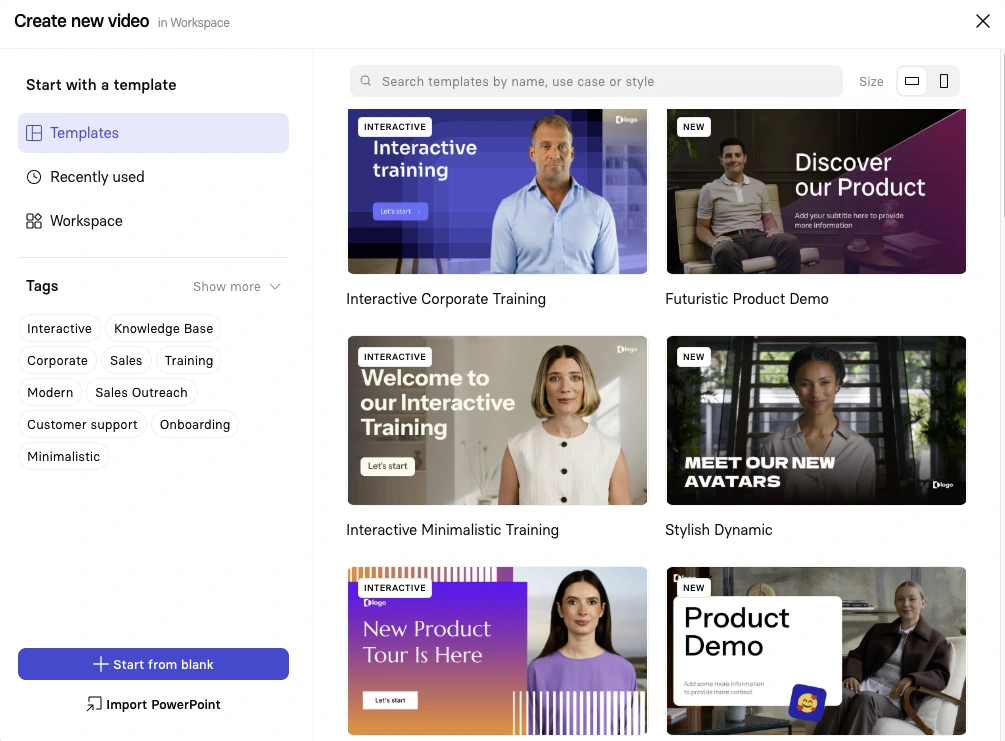
In this Synthesia Review, one thing stands out immediately — how effortless it is to create a professional video from plain text. Within minutes, you can go from script to a full-HD video with lifelike avatars, realistic voices, and no need for a camera or microphone. The workflow feels almost like working in PowerPoint: choose a template, paste your text, pick an avatar, and let the AI handle the rest. For marketers, educators, or teams scaling multilingual content, that’s a major time-saver. The latest Express-2 engine delivers noticeably smoother gestures and more natural facial movements than older versions. One-click translation and AI dubbing are equally impressive — in testing, it translated a video into Spanish in seconds, maintaining timing and tone without rerecording. These features make Synthesia genuinely useful for companies that need to reach global audiences quickly. Avatars are diverse and customizable; you can even create a personal avatar of yourself for consistent brand storytelling. While the Essential plan keeps personalization limited, upgrading unlocks advanced options like your own cloned avatar and branded video pages. The Starter plan offers good value for solo creators, but you’ll likely move up to the Creator tier for real production work and longer videos. On the downside, avatar motion can still look slightly robotic in certain gestures, and deep, cinematic storytelling isn’t its strength — Synthesia shines in clarity, not artistry. Video generation takes roughly 10–15 minutes depending on length, so it’s fast but not instant. Also, truly interactive videos and API access are restricted to higher tiers. Still, the trade-off is worth it for most professionals. Synthesia’s interface, collaboration tools, and enterprise-grade security make it a trusted platform for scalable video production. Whether you’re training global teams, launching multilingual campaigns, or replacing costly studio shoots, Synthesia delivers consistent, branded results that look remarkably polished for the time invested. Verdict: Synthesia remains the leading AI video platform for text-to-video creation. It’s not a replacement for cinematic editing tools, but it is the fastest, most reliable way to turn ideas into multilingual videos at scale — all inside your browser.
-
Descript vs Synthesia
Add to Compare
What to Watch Out For
-
No 4K export; capped at 1080p/30fps (Aug 2024)
Independent testing notes Synthesia outputs are limited to 1080p at 30 fps with no 4K export option as of Aug 2024. This cap applies even on higher tiers according to third‑party reviews.
Why it Matters
If you need UHD deliverables for broadcast, large displays, or heavy post-production reframing, the 1080p ceiling may be a constraint and affect tool selection.
-
Annual minute caps on lower tiers; verify current quotas
As of Aug 2024, eWeek reported annualized video quotas on lower plans—about 120 minutes/year (Starter) and 360 minutes/year (Creator). In 2025, third‑party listings show differing price points and mention a Corporate tier with “unlimited” minutes, indicating plan terms change and vary by source.
Why it Matters
Production planning depends on actual minute allowances; confirm current quotas and any “unlimited” fair‑use limits with the vendor before committing.
These insights are drawn from publicly available reviews and user feedback to highlight potential issues real users have reported.
Synthesia Pros
Synthesia Cons
Honest Synthesia Review – What You Need to Know Before You Start
Synthesia Review: Synthesia is an AI video platform that runs in the browser and turns written text into realistic talking-head videos in over 140 languages using lifelike avatars and voice cloning. It offers hundreds of natural-sounding voices and 230+ stock avatars, along with personal avatars that can speak 29 languages. The platform includes one-click translation, AI dubbing, templates, and a media library, letting teams produce training, marketing, and explainer videos quickly. Synthesia’s Express-2 engine uses a diffusion transformer model for full-body avatars and in-context voice cloning to deliver 1080p, 30 fps videos with natural gestures and lip sync. SOC 2 Type II, GDPR, and ISO 42001 compliance ensure strong data privacy and governance.
Synthesia Review (Video Walkthrough)
Synthesia Features & Capabilities
Inside Synthesia



Synthesia Use Cases
Synthesia Is Ideal For
Synthesia Alternatives
-
Reviewed
Video Verified
VEED.IO pricing and free plan minute limits, export quality (including 4K), eye contact, captions, and transcription explained below.
Pricing Model:
Freemium
Starts at:
12 USD